
Web server

Centos 7.3 How to install Apache 2.4, PHP 7.1 and MySQL (MariaDB)

Enable Network

Display network status

# nmcli d

Start network manager

# nmtui
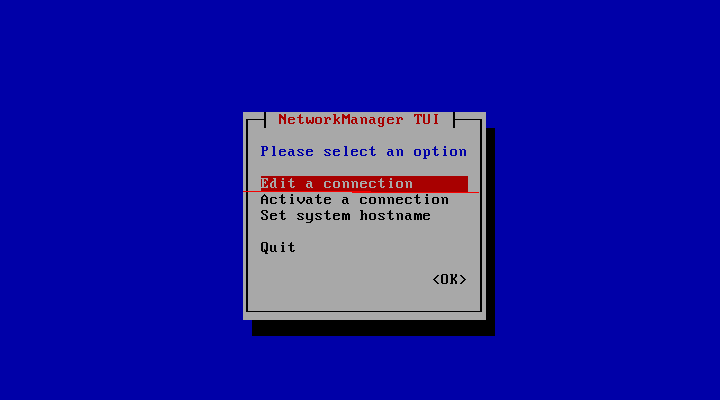
Edit the connection to Automatically connect

Make GUI Default

Centos 7

# yum group install "GNOME Desktop" "Graphical Administration Tools"

RHEL 7

# yum groupinstall "Server with GUI"

Run the following to make the GUI start on reboot

# ln -sf /lib/systemd/system/runlevel5.target /etc/systemd/system/default.target

Start SSH service

# systemctl restart sshd.service

# firewall-cmd --add-port=22/tcp --permanent

#  firewall-cmd --reload

Setup servers MariaDB, Apache and PHP

Based on Article: How to install Apache, PHP 7.1 and MySQL on CentOS 7.3 (LAMP)

I will add the EPEL repo here to install latest phpMyAdmin as follows:

rpm --import /etc/pki/rpm-gpg/RPM-GPG-KEY*
yum -y install epel-release

Apache Log File Tools

AWStats Logfile Analyzer

I wanted to report on basic activity on my web server so I found and installed AWstats, which I really like.

Importing Apache logs into SQL

Later I wanted to see more details so I started looking for a way to convert Log file entries to database tables.  I found the following on goolge and listed them in the order I think will work best on linux.

  1. Importing Apache (httpd) logs into MySQL
  2. LogToMysql - piped logging from Apache to MySQL
  3. Query Apache logfiles via SQL (windows)
  4. Parsing Apache access_log files using php, mySQL LOAD, importing to mySQL
  5. Convert apache http combined logs into sql (and import it into a mysql database eventually)

My log files from apache with awstats are in the combined format as follows:

LogFormat "%h %l %u %t \"%r\" %>s %b \"%{Referer}i\" \"%{User-Agent}i\"" combined

Subject

Speed up web site

What is Google Page Speed?

Page Speed is an open-source Firefox/Firebug Add-on. Webmasters and web developers can use Page Speed to evaluate the performance of their web pages and to get suggestions on how to improve them.

How To Optimize Your Site With GZIP Compression

Compression is a simple, effective way to save bandwidth and speed up your site. I hesitated when recommending gzip compression when speeding up your javascript because of problems in older browsers.

But it’s the 21st century. Most of my traffic comes from modern browsers, and quite frankly, most of my users are fairly tech-savvy. I don’t want to slow everyone else down because somebody is chugging along on IE 4.0 on Windows 95. Google and Yahoo use gzip compression. A modern browser is needed to enjoy modern web content and modern web speed — so gzip encoding it is. Here’s how to set it up.

Wait, wait, wait: Why are we doing this?

Before we start I should explain what content encoding is. When you request a file like http://www.yahoo.com/index.html, your browser talks to a web server. The conversation goes a little like this:

Subject

NSS_Initialize failed when starting Apache httpd

I got the following error in /var/log/httpd/error_log when trying to start httpd on Fedora11 64 bit:

NSS_Initialize failed. Certificate database: /etc/httpd/alias.
SSL Library Error: -8038 SEC_ERROR_NOT_INITIALIZED

Which led me to discover the file /etc/httpd/install.log

############################################
Generating new server certificate and key database.
############################################
/usr/sbin/gencert: line 91: /usr/bin/certutil: No such file

I found I needed to install certutil by typing

yum install nss-tools*

Then I ran

/usr/sbin/gencert /etc/httpd/alias

Next I tried starting httpd again and it worked.

Update: when I checked the /var/log/httpd/error_log however I found I was still getting errors like the following:

[error] NSS_Initialize failed. Certificate database: /etc/httpd/alias.
[error] SSL Library Error: -8038 SEC_ERROR_NOT_INITIALIZED

So I found this page of instructions and tried it

Using certutil with CentOS

The only thing I can think of that caused this is I have automatic software updates for Fedora11 turned on.

Subject

Varnish commands

Setting up Varnish

Varnish has a set of command line tools and utilities to monitor and administer Varnish. These are:

  • varnishncsa: Displays the varnishd shared memory logs in Apache / NCSA combined log format
  • varnishlog: Reads and presents varnishd shared memory logs.
  • varnishstat: Displays statistics from a running varnishd instance.
  • varnishadm: Sends a command to the running varnishd instance.
  • varnishhist: Reads varnishd shared memory logs and presents a continuously updated histogram showing the distribution of the last N requests by their processing.
  • varnishtop: Reads varnishd shared memory logs and presents a continuously updated list of the most commonly occurring log entries.
  • varnishreplay: Parses varnish logs and attempts to reproduce the traffic.

For further information and example of usage, please refer to the man-pages.

varnishtop

This command shows the most often-made requests to the backend:

Subject