Web Performance and Load Testing Tools for Linux
Curl - Give detailed response time for loading a page
ab - ApacheBench request generator tool, generate get requests to specified URL
pingdom.com - Full Page load waterfallTest your webpage from remote locations like New York, San Jose.
seige - Siege is an http load testing and benchmarking utility, supports basic authentication, cookies, HTTP, HTTPS
Using CURL to test website response time.
Detailed timing of a website response
The following command returns lookup, connect, pretransfer, starttransfer time in seconds and the total time that the full operation lasted.
$ curl -s -w '\nLookup time:\t%{time_namelookup}\nConnect time:\t%{time_connect}\nPreXfer time:\t%{time_pretransfer}\nStartXfer time:\t%{time_starttransfer}\n\nTotal time:\t%{time_total}\n' -o /dev/null http://www.shellhacks.com
Sample output:
Lookup time:    0,004
Connect time:   0,022
PreXfer time:   0,022
StartXfer time: 0,068

Total time:     0,125
Brief options description:
| Option | Description |
|---|---|
| Lookup time (time_namelookup) | The time, in seconds, it took from the start until the name resolving was completed |
| Connect time (time_connect) | The time, in seconds, it took from the start until the TCP connect to the remote host was completed |
| PreXfer time (time_pretransfer) | The time, in seconds, it took from the start until the file transfer was just about to begin. This includes all ‘pre-transfer’ commands and negotiations that are specific to the particular protocol(s) involved |
| StartXfer time (time_starttransfer) | The time, in seconds, it took from the start until the first byte was just about to be transferred. This includes ‘time_pretransfer’ and also the time the server needed to calculate the result |
More detailed timing of a website response
The following command adds appconnect and redirect time in seconds, to the previous report. These options are available in a latest versions of CURL.
$ curl -s -w '\nLookup time:\t%{time_namelookup}\nConnect time:\t%{time_connect}\nAppCon time:\t%{time_appconnect}\nRedirect time:\t%{time_redirect}\nPreXfer time:\t%{time_pretransfer}\nStartXfer time:\t%{time_starttransfer}\n\nTotal time:\t%{time_total}\n' -o /dev/null http://www.shellhacks.com
Sample output:
Lookup time:    0,003
Connect time:   0,020
AppCon time:    0,000
Redirect time:  0,000
PreXfer time:   0,020
StartXfer time: 0,963

Total time:     1,001
Brief options description:
| Option | Description |
|---|---|
| AppCon time (time_appconnect) | The time, in seconds, it took from the start until the SSL/SSH/etc connect/handshake to the remote host was completed (Added in 7.19.0) |
| Redirect time (time_redirect) | The time, in seconds, it took for all redirection steps include name lookup, connect, pretransfer and transfer before the final transaction was started. ‘time_redirect’ shows the complete execution time for multiple redirections. (Added in 7.12.3) |
Use --version to see if your CURL supports these options.
$ curl --version
ab
ab is installed as part of apache, but you can install it seperate with:
yum install ab
ab -n 100 -c 5 http://localhost/drupal-7.28/
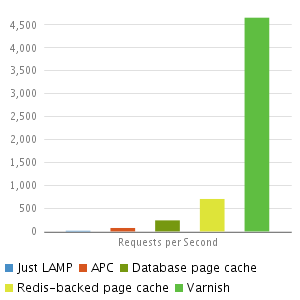
Results of load testing with changes outlined below with Drupal 7
|
Milestone
|
Requests per Second
|
|---|---|
| Bare Drupal 7.28 Install | 14.04 |
| apc.php | 75.50 |
| opcache | 95 |
| opcache + page cache -remote host | 154 |
| opcache + page cache -localhost | 689 |
| Redis | |