Free Linux distribution from RedHat, much more up to date. Better for Desktop.

Solr for two sites running Drupal 6 Search on Tomcat 6 / CentOS 6

Note this tutorial sets up two seperate solr applications in tomcat, not multi core in one java application.

ApacheSolr for Drupal 6 improves on the out-of-the-box search experience for Drupal users. The easiest way to get Solr running on your Drupal web site is to use the hosted service provided by Acquia; it is way easier than running your own Solr. You simply point your queries to their Solr server and you’re done.

For various reasons, you might want to run your own Solr web service on your own machine. In this article, I will walk you through setting up a working Solr installation using Tomcat 6 on CentOS 6. The end result of this walkthrough will be two separate Solr indexes (via two separate Solr web apps) for two different web sites running on a single Tomcat. I will assume that you are using Acquia’s Drupal (which ships with SolrPHPClient).

Warning: This article assumes all services are on a single machine (suitable for a small organization). Running Solr on a separate machine is possible but raises security implications that are outside the scope of this article.

These are the tasks that we will work on:

How to setup Home Video surveillance with IPcam webcam

When my sons IPod was taken from our house I decided it was time to setup video surveillance of our home.

I first select the IPcam FI8918w and have it FTP images to my Fedora server.

For my Android phones and Tablets IP Cam Viewer is a great application.  The pro version does support two way audio and cost $3.99

I found out that audio support on the Iphone is limited with this camera, the Baby monitor app does include audio but it costs $6.99.

To get audio to work with Firefox you must first download and install the Mozilla plugin from videolan.org as mentioned on this support page.

Next, I plan to evaluate ZoneMinder on Fedora so I can control the motion detion actions better.  Update after trying all day to get ZoneMinder to work on Fedora 11 I gave up.  Now I am trying it on my other server which is Fedora 14, things are going better so far.

Update: for Fedora 19 be sure to read: /usr/share/doc/zoneminder-1.25.0/README.Fedora

I install ZoneMinder, then had to add the control file for my camera in the directory:

/usr/lib/perl5/vendor_perl/5.10.0/ZoneMinder/Control

Subject

Fedora Install and configure tips

I like to start by following these guides, with a few short cuts and additions:

The Perfect Desktop - Fedora i686 (GNOME)

This is a great screen by screen guide to help you download and install Fedora

easyLife

After installing Fedora 14 the big short cut is to use easyLife, download and install easyLife for Fedora here.  This provides one application that you can use to add all the "not completly opensource" stuff you really need to make Fedora useful.  Things like the following list are just a couple of clicks away:

  • Sets "sudo" command up for your regular user;
  • Configures RPMFusion repository for extra and non-free software;
  • Installs Flash Player plugin;
  • Installs all kinds of Codecs (h264,divx,xvid,mp3 etc);
  • Installs nvidia drivers;
  • Installs Skype;
  • Installs Sun Java and Sun Java Plugin for Firefox;
  • Integrates Sun Java with system-switch-java;
  • Installs Google apps (Picasa, Desktop);
  • And many others...

GUI Administration Tools

For some reason several items I am used to having needed to be added manualy to this Fedora release.  For example to use graphical tools for administration I had to run the following commands and then choose 'y' to install the GUI utility.

To allow the starting stoping and configuring of services:

system-config-services

Subject

Upload progress PECL uploadprogress library

In my Drupal status report I get the following message:

Your server is capable of displaying file upload progress, but does not have the required libraries. It is recommended to install the PECL uploadprogress library

So I decided to enable this on my Fedora server (same for CentOS), since I will probably need to do this on more servers, here are the steps it takes:

# yum install php-devel
# pecl install uploadprogress

if you get: pecl: command not found then you will need to run:

# yum install pear

Note: I found out this did not work because the name is now php-pear so use:

# yum install php-pear

Now you can finally run the command you need:

# pecl install uploadprogress

Note: if you get the error configure: error: no acceptable C compiler found

# yum install gcc

Add this line to /etc/php.ini

vi /etc/php.ini

insert extension=uploadprogress.so

And of course you will need to restart apache to make it take affect:

# /etc/init.d/httpd restart

Subject

Which is better #Fedora 13 or #Ubuntu 10.04

The state of the Linux desktop

I'm a fan of Fedora and Ubuntu, but for different reasons. Fedora, while unpolished, is a solid distro for adventurous Linux users and developers who want to be on the bleeding edge. Power users deserve a good distro that is usable and feature-complete without a lot of polish or distraction - and that's what Fedora is.
Ubuntu is the flip side. It's very polished, closing in on Apple in terms of usability and applications. It's not quite there yet, but getting closer and certainly a persuasive distro for people switching from Windows. If you're looking to get a friend started with Linux, don't hesitate to begin with Ubuntu.

Benchmarks for Graphics

Published on June 02, 2010
Written by Michael Larabel

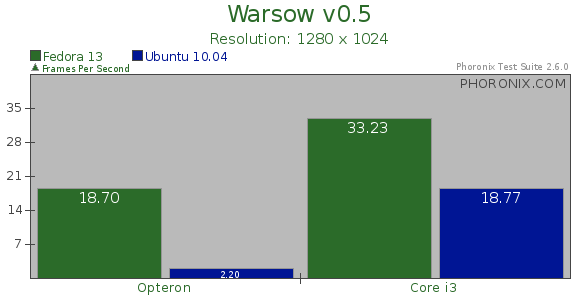
When running the Warsow gaming test, both the Intel and Radeon graphics had favored Fedora 13 over Ubuntu 10.04 LTS. The Mesa stack found in Ubuntu 10.04 LTS has a bug with Warsow where its frame-rate is consistently low (2~3 FPS) with the Radeon R600/700 ASICs, but this has since been resolved and is fine with Mesa 7.8.1 in Fedora. Improvements in the Clarkdale graphics performance with the Fedora 13 packages led to its frame-rate being 77% higher than under Ubuntu's Lucid Lynx.

Subject

Install awstats web site statistics on Fedora

First install awstats with RPM or from the Add/Remove Software menu.

Configure Awstats

Then run the following command to configure awstats

sudo /usr/share/awstats/tools/awstats_configure.pl

You will be prompted to:

  1. supply the path to your /etc/httpd/conf/httpd.conf file.
  2. want to create a new config file? y
  3. name the config: mydomain.com
  4. path to the config file: /etc/awstats

Automate updating the awstats

Finally I added the following to a script file usage.sh and called it from a cron entry every week:

#!/bin/sh

perl /usr/share/awstats/wwwroot/cgi-bin/awstats.pl -config=myconfig -update

perl /usr/share/awstats/wwwroot/cgi-bin/awstats.pl -config=myconfg -output -staticlinks > awstats.myhost.html

To see the stats go to the URL:

Subject